All features

Know which AI you use

AI systems inventory

Know which AI your organisation uses, what for and with which data, in a single record that stays up to date.

What it is for

The inventory records every AI system your organisation uses: one per distinct AI function, including those that live inside a larger piece of software. It is the cornerstone of the product: without an inventory there is no classification, no controls and no assessments.

It is also your tool against shadow AI —systems in use without management knowing—: what you declared at sign-up gives you a starting list so that none is left out.

Risk classification, provider due diligence and the M2 and M3 modules all work on the systems you record here. That is why the inventory is never fully closed: it is a living record that stays editable and goes back to “In progress” when you add a new system.

How it works

A two-step form

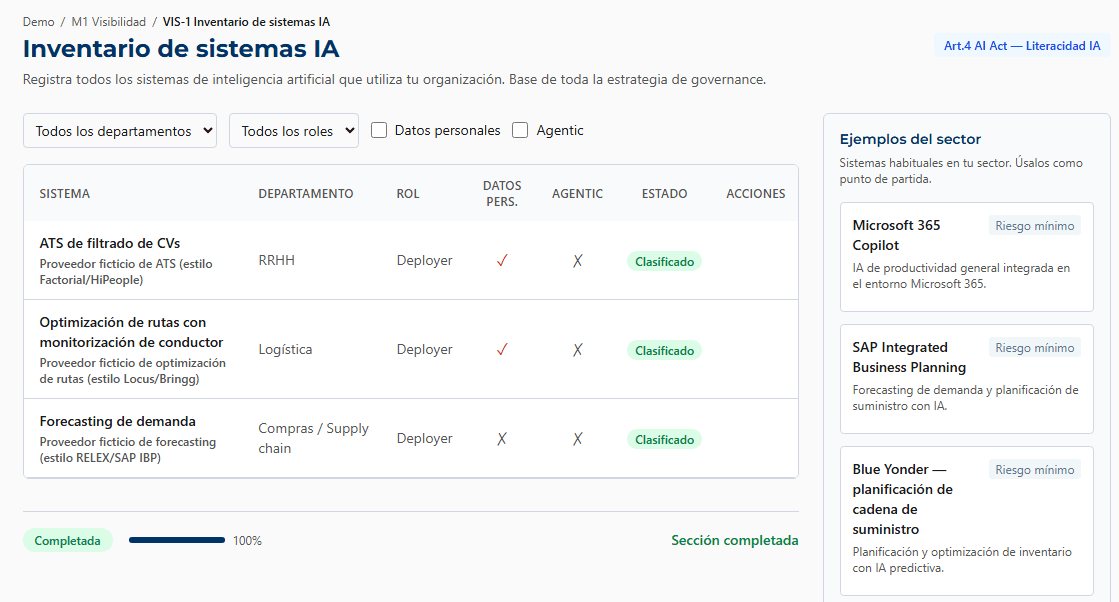
First the basic details (name, provider, purpose, department), then the detail (your role, personal data, whether it is an agent, notes). The purpose is described in concrete terms —“analysis of panoramic X-rays”, not “diagnosis”— because it steers the later classification. The provider can be linked to its record in provider due diligence.

Your role and the data it processes

For each system you state whether your organisation uses it under its authority (deployer), places it on the market or puts it into service under its own name or trademark (provider) or both; most SMEs are deployers. You mark whether it processes personal data and which categories: identification, health, biometric, financial… If the system acts autonomously, you mark it as an agent and it is managed in the Agentic module.

Examples from your sector as a starting point

While you fill in the form, the “Sector examples” panel shows systems common in your sector. With “Use as a starting point”, the form is filled in with the example and you change whatever does not fit your case. They are a guide: record the ones you actually use, whatever they are called.

What each system does

On each row you mark its capabilities: generates text, generates images, audio or video, chats with people, makes decisions or recommendations about people, builds profiles, acts autonomously, screens candidates… It is your own record: it does not classify anything by itself. If you change a capability after classifying, that system's classification goes into review.

Active, inactive and workplace scope

A system you stop using is marked as inactive instead of being deleted, so its history is kept; the filter switches between active systems only and all of them. The inventory records which systems make decisions about your staff's working conditions (Real Decreto 723/2026, organisations in Spain). The Owner, the AI Officer and Contributors record and edit systems; only the Owner deletes them.

AI systems inventory screen (VIS-1) of a dental clinic, with sample data
Demo account · fictitious data

Basis

The controls in the Alethexis catalogue that this feature helps to document, with their legal basis where they have one, and their nature.

  • BPRecommended good practice
  • IMInternal methodological control
BPRecommended good practiceM1-VIS-002

Minimum attributes per system in the inventory

For each system, document: name, provider, declared intended purpose, user department, deployment date, and active or retired status. Without these fields no classification or evidence workflow can run.

IMInternal methodological controlM1-VIS-003

EU AI Act role assessment per system

Determine, for each system, whether the organisation acts as deployer, provider or both (Articles 3(3) and 3(4)). The assessment governs which obligations apply and is persisted in the inventory for all subsequent workflows.

Legal basis

No direct basis in law.

BPRecommended good practiceM1-VIS-001

Initial inventory of active AI systems

Identify and record every AI system in use across the organisation, including SaaS, APIs, copilots, plugins and models embedded in vertical applications. It is the basis of all subsequent governance and a precondition for risk classification (VIS-2).

Data from the controls catalogue. The labels show the regulatory nature of each control; they are not a statement of compliance.

Available in

  • M1Visibility
  • M2Governance
  • M3High-Risk Ready

Modules build on each other: M2 includes everything in M1, and M3 includes M1 and M2.

FAQ

What counts as an “AI system” for the inventory?
Any tool that uses AI to analyse, predict, recommend, generate or decide. If in doubt, record it and describe it; the AI Officer will refine it during classification.
Do I record AI functions that sit inside a larger piece of software?
Yes. If your management software includes, for example, absence prediction, record that function as a system; the rest of the software without AI does not go here.
Are the tools I ticked at sign-up added automatically?
No. The tools you ticked during onboarding are not copied here automatically: review them and add the ones you use to the inventory. With M2 or M3, when the approval of an AI use request is recorded, the tool does enter the inventory on its own.
Should I archive or delete a system I no longer use?
Archive it (mark it as inactive). It keeps the history and does not break past classifications. Permanent deletion is reserved for the Owner, for mistakes.
When is the inventory considered finished?
When you decide: the section is only completed when you press “Finalise section”, because the automatic recalculation stops at 80 % at most. Closing the inventory means stating that it is complete, and that statement is made by you, not by a counter.

Try it with your own systems