
Governance
From knowing what you have to governing it with evidence and traceability.
5 users included
Includes everything in M1 · Visibility
What it solves
Having the inventory is not enough. To answer an audit — from a large client or from an authority — you need a clear decision structure, assigned owners and a trail of every decision. M2 turns visibility into operational governance.
What it includes
Governance structure and AI Committee
AI Committee with defined roles, quorum and responsibilities, documented in the Committee Charter, exportable as a PDF with its hash.
See the featureRACI matrix
Who is responsible, who approves, who is consulted and who is informed of each AI decision. With PDF.
See the featureRisk register
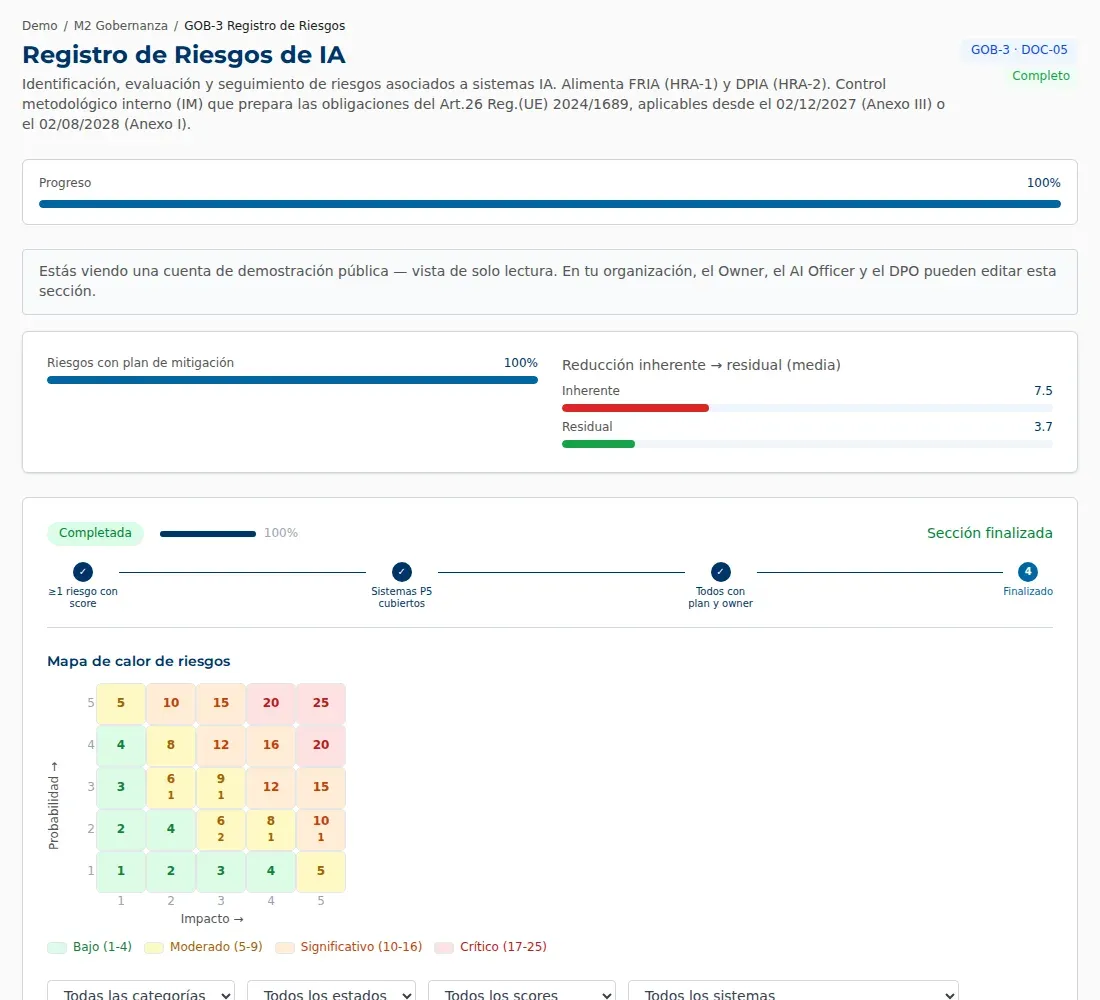
Risks identified on a 5×5 heatmap, with their mitigation plan and follow-up.
See the featureAuditable decision log
Every relevant decision is recorded with its context, author and date. Real traceability.
See the featureChange management
Log of changes to any AI system in the inventory and Article 25(1) assessment: it warns when a change would make your organisation the provider of a high-risk system.
See the featureOperations and monitoring
Tiered incident management (N1/N2/N3) and a record of operational events —near misses, drift, degradation, security— for your AI systems. In an N3 incident involving a personal data breach, it records the date on which your organisation became aware of it —with a justification if it is later than detection— and calculates from that date the 72-hour reference deadline under Article 33 GDPR. It does not notify the supervisory authority or decide whether there was a breach. Notices can also arrive through the Integrations inbox.
Integrations inbox
The tools you authorise send incident notices, detected AI tools and evidence. Each entry stays pending until a person in your organisation confirms or discards it, and each source has its own revocable credential.
See the featureWorkers' legal representatives
Control for Article 64(4)(d) of the Estatuto de los Trabajadores, the collective layer of workplace algorithmic transparency, with its evidence (Spain's national layer). Since 5 October 2026, Spain's RD 723/2026 adds individual written information for each worker.
See the featureOwn product
If your organisation is the provider of an AI system: its versions, the changes between them with the substantial-modification assessment recorded as an act of the provider, and the provider's obligations with their evidence. Deployer information sheet and change log as PDFs with a SHA-256 integrity hash. Which obligations a provider has depends on what it provides: if its system is high-risk, those of Arts. 17, 18, 72, 73 and Annex IV; if it is a general-purpose AI model, those of Arts. 53 to 55; otherwise, the transparency obligations of Art. 50 where they arise.
See the featureEvidence from day one
In M2, each piece of evidence can also be linked to decisions in the log (GOB-4), to risks (GOB-3) and to incidents (GOB-6), and incident records are added. Your external auditor sees the evidence index from their temporary access, without an account in your team.
Your auditor reviews it on their own.
You give an external auditor a temporary access — 7, 30 or 90 days — with a link and a code they receive by email. There is no need to create an account for them or add them to your team. They see the inventory, the classifications, the status of the sections, the approval history, the evidence index and the audit log, in a minimised view, with no direct user identifiers. Every access and every download are logged, you can disable downloads, and you revoke it whenever you want.
- Read-only, with a mandatory expiry.
- Access and downloads logged in your history.
- Immediate revocation.
Decisions, with a name and a date.
The AI use policy, substantial changes and high-risk mitigations are not simply taken on trust: they are recorded. Each approval keeps who recorded it, in what role, when, and over which version of the document, with an integrity hash. When a critical section is closed, whoever closes it confirms that, based on the information available and within their area of responsibility, the information is up to date and reasonably complete, and that statement is also recorded. The history is shown on screen and travels with the PDF. Each decision keeps an exact copy of what its approval covers, with its integrity hash: if the section is reopened, the earlier approval stays intact and the new one is kept apart.
Before using a new AI tool, you ask.
Anyone in your organisation can ask to use an AI tool: members, from the platform; the rest of the staff, through a link with work email verification, without needing an account. People who request through the link are not added to your team. The request records which tool it is, what it is for, who will use it and whether it processes personal data. The AI Officer reviews it — and the DPO too if there is personal data — and the Owner or the AI Officer records the decision. Once the approval is recorded, the tool enters the inventory on its own and follows the normal classification circuit. Nobody has to chase anybody: each person gets at most one email a day with what is pending, and each item is reminded once a week while it stays pending.
Alethexis talks to your systems.
A read API to query your inventory, classification, control status, evidence and audit log from your own tools or your advisor's. Webhooks to get notified when a section is closed, an approval is recorded or a high risk appears. And single sign-on with Microsoft Entra ID or Google Workspace. All included from M2; public documentation at /docs/api.
- Read-only API with keys per organisation and a quota.
- Webhooks with retries and a delivery log.
- SSO per organisation, which the Owner can make mandatory.
Also includes
What this module inherits from the previous ones, explained in full in the module it comes from.
- Status report for your committee · in M1 · Visibility
- Audit log with integrity verification · in M1 · Visibility
A look at the screen
Demo account · fictitious data
What you take away
- AI Committee charter as PDF
- RACI matrix as PDF
- Auditable risk register and decision log
Users and support
5 users included · additional users: €12/user/month.
Priority support: first response within one business day.
Requests are handled through the ticketing system built into the platform, with tracking and traceability for each one.
Ready to get started with M2?
14-day free trial, no card required. Configured for your sector.
See all modules